

MEMBERS:

NURFAZLINI
 | ||
SYAFIQAH NUR AIN
|

CSC 134
STORAGE
What is storage?
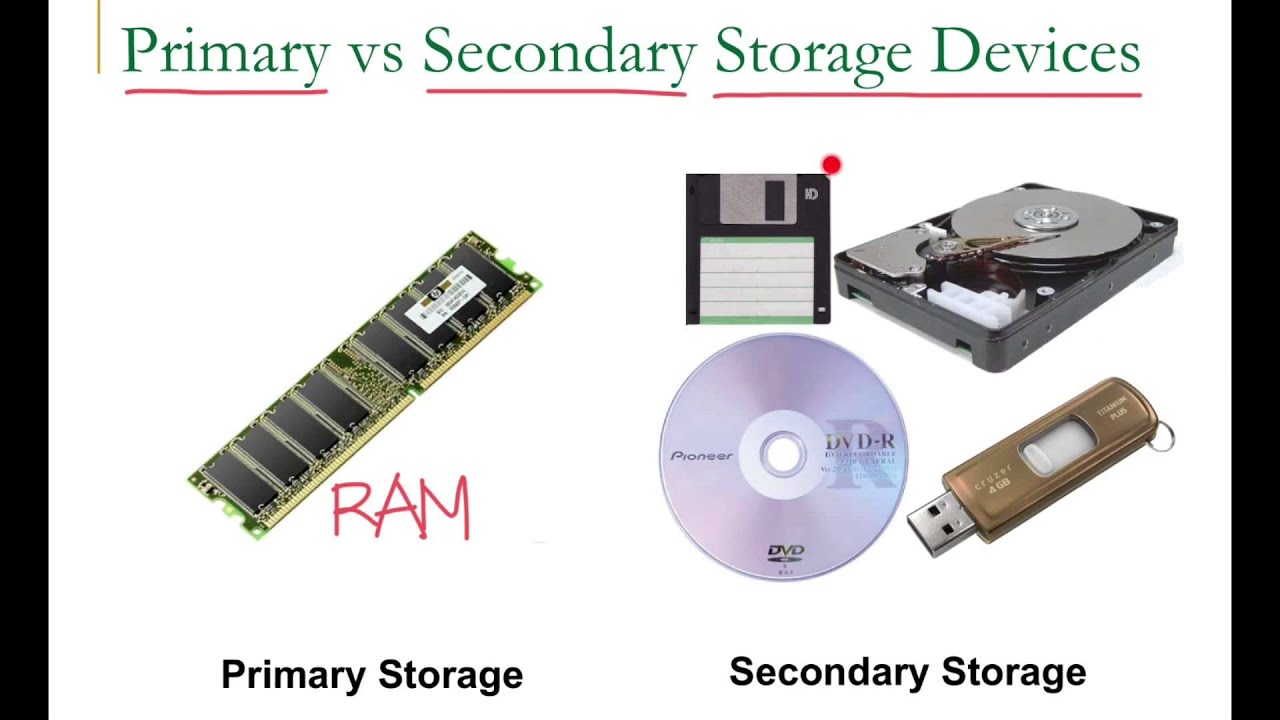
Storage or storage device is any computing hardware that is used for storing, porting and extracting data files and objects. It can hold and store information both temporarily and permanently, and can be internal or external to a computer, server or any similar computing device.
Examples of storage device

ADVANTAGES OF STORAGE DEVICES:

Process involving storage
1. Reading = Process of transferring items from a storage medium into memory
2. Writing = Process of transferring items from memory to a storage medium
What is capacity?
It is the number of bytes a storage medium can hold

1.Flash Memory Storage
- Type of solid state media and contain no moving parts.
- Solid state drives (SSDs) have several advantages over magnetic hard disks:
- Faster access time
- Faster transfer rates
- Generates less heat and consume less power
- Last longer
2. Memory card
- Removable flash memory device that people insert and remove from slot in a computer, mobile device or card reader/writer
- Type of memory cards:

3. USB Flash Drive
- known as a USB drive, USB stick, USB key, USB, and a variety of other names, is a data storage device that includes flash memory with an integrated USB interface. USB flash drives are typically removable and re writable, and physically much smaller than an optical disc.
- Functions: for storage, data back-up and transfer of computer files. They are smaller, faster, have thousands of times more capacity, and are more durable and reliable because they have no moving parts.
The basic use of USB Flash Drive
Express card module:
- Is an interface to connect peripheral devices to a computer, usually a laptop computer.
- The ExpressCard technical standard specifies the design of slots built into the computer and of expansion cards to insert in the slots

4. Hard disk
- contains 1 or more inflexible, circular platters, that use magnetic particles to store data, instructions and information
- Can store data using longitudinal or perpendicular recording
- Characteristic:
- Capacity
- Platters
- Read/Write
- Cylinders
- Sectors and Tracks
- Revolutions per Minute
- Transfer Rate
- Access Time
- How it works

- Hard disk arms move the read/write head, which reads items and writes items in the drive
- A head crash occurs when a read/write head touches the surface of platter
- Always keep a backup of hard disk
- RAID (redundant array of independent disks) is a group of two or more integrated hard disks.

- A network attached storage (NAS) device is a server connected to a network with the sole purpose of providing storage

5. Tape

- it is low cost.
- requires sequential access, which is refers to reading or writing data consecutively.
6. Optical disc

- An optical disc consists of a flat, round, portable disc made of metal, plastic, and lacquer that written and read by a laser
- Typically store software, data, digital photos, movies, and music
- Type of optical discs such as :
a

Care of optical discs
- DO store the disc in jewel box when not in use
- DO hold disc by its edges
- DO NOT eat, smoke or drink near a disc
- DO NOT expose disc to excessive heat or sunlight
- DO NOT stack disc

Care of optical discs
how CD's work
7. Magnetic stripe card

A magnetic stripe card is a type of card capable of storing data by modifying the magnetism of tiny iron -based magnetic particles on a band of magnetic material on the card. The magnetic stripe, sometimes called swipe card or magstripe, is read by swiping past a magnetic reading head.
How does a magnetic stripe at the back of the credit card work?
 The stripe on the back of a credit card is a magnetic stripe, often called a magstripe. The magstripe is made up of tiny iron-based magnetic particles in a plastic-like film. Each particle is really a very tiny bar magnet about 20 millionths of an inch long. The magstripe can be "written" because the tiny bar magnets can be magnetized in either a north or south pole direction. The magstripe on the back of the card is very similar to a piece of cassette tape fastened to the back of a card.
- Example of magnetic stripe card is a credit card , entertainment card, bank card, or other similar card with a stripe that contains information identifying you and the card.
- information that are stored in the stripe is our name, account number, and the card's expiration date.
8. Smart card

- similar size to a credit card or ATM card
- to stores data on a thin microchiprocessor embeded in the card
- contain a processor and have input, porocess, output, and storage capabilities.
USES :
1. storing medical record
2. vaccination data
3. other health
4. identification information
5. tracking information (customer purchases)
6. employee attendances
7. storing a prepaid amount of money (student purchases in campus)
9. Cloud storage

- Is a service model in which data is maintained, managed, backed up remotely and made available to
users over a network.
- Users generally pay for their cloud data storage on a per-consumption, monthly rate.
- Although the per-gigabyte cost has been radically driven down, cloud storage providers have added
operating expenses that can make the technology more expensive than users bargained for.
- Providers have tried to deal with those fears by building security capabilities, such
as encryption and authentication, into their services.
9. Cloud storage

- Is a service model in which data is maintained, managed, backed up remotely and made available to
users over a network.
- Users generally pay for their cloud data storage on a per-consumption, monthly rate.
- Although the per-gigabyte cost has been radically driven down, cloud storage providers have added
- Providers have tried to deal with those fears by building security capabilities, such
as encryption and authentication, into their services.
- There are three main cloud-based storage architecture models: public, private and hybrid.


PUTTING ALL TOGETHER
* Many factors influence the type of storage devices that you should use:
1. The amount of data
4. The hardware and software in use
5. The desire cost
USER
|
TYPICAL STORAGE DEVICES
|
1.HOME
|
o 320
GB hard disk
o Cloud
storage
o Optical
disk drive
o Card
reader / writer
o USB
flash drive
|
2.
SMALL OFFICE /
HOME
OFFICE
|
o 1
TB hard disk
o Cloud
storage
o Optical
disk drive
o External
hard disk for backup
o Portable
hard disk for backup
|
3.
MOBILE
|
o 250
GB hard disk
o Cloud
storage
o Optical
disk drive
o Card
reader/writer
o Portable
hard disk for backup
o USB
flash drive
|
4.
POWER
|
o 2.5
TB hard disk
o Cloud
storage
o Optical
disk drive
o Portable
hard disk for backup
o Portable
hard disk for backup
|
5.
ENTERPRISE
|
o DEKSTOP
COMPUTER
-
1 TB hard disk
-
Optical disk drive
-
Smart card reader
-
Tape drive
-
USB flash drive
o SERVER
OR MAINFRAME
-
Network storage server
-
40 TB hard disk system
-
Optical disk server
-
Microfilm or microfiche
|
********************************************************************************************************


